Knowledge

Solidot Distributed I/O XBF4-PN04 Troubleshooting and Resolution Guide for Communication Issues
The XBF4-PN04 is a PROFINET bus coupler module belonging to Solidot's distributed I/O series. This module features two RJ45 PROFINET ports on its top for communication with a PROFINET master PLC. On its front panel, there are four RJ45 XBF expansion ports, allowing for serial daisy-chaining of various types of distributed I/O modules. Each port can serially connect up to 16 modules (modules are designed with address dial switches for station numbers 0-F, which must be unique), enabling a maximum total expansion of 32 distributed I/O modules.
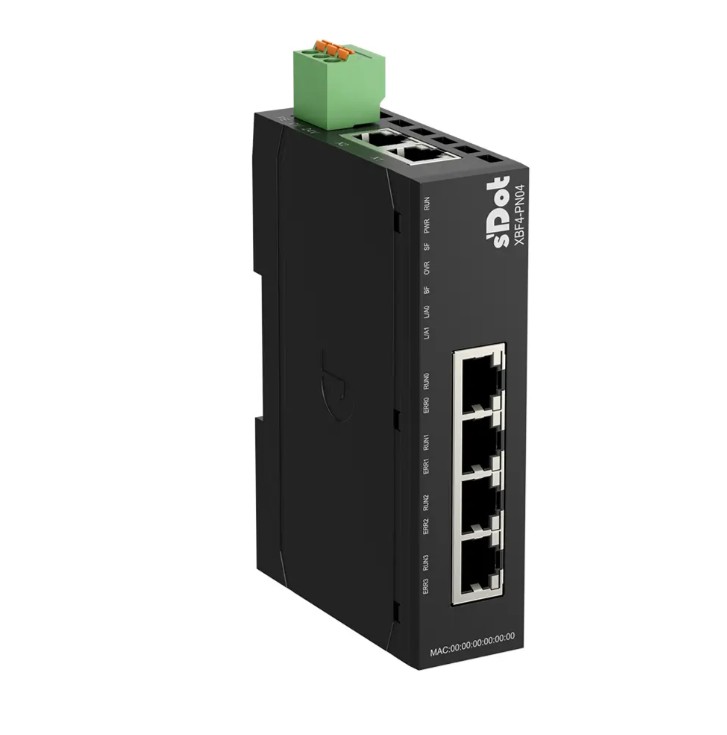
During the use of the XBF4-PN04, users may encounter issues where normal communication with the PROFINET master cannot be established during configuration or operation. This guide systematically explains how to quickly locate and resolve such communication problems by observing indicator statuses and performing step-by-step troubleshooting.
1. Preparation: Identifying Indicator Statuses
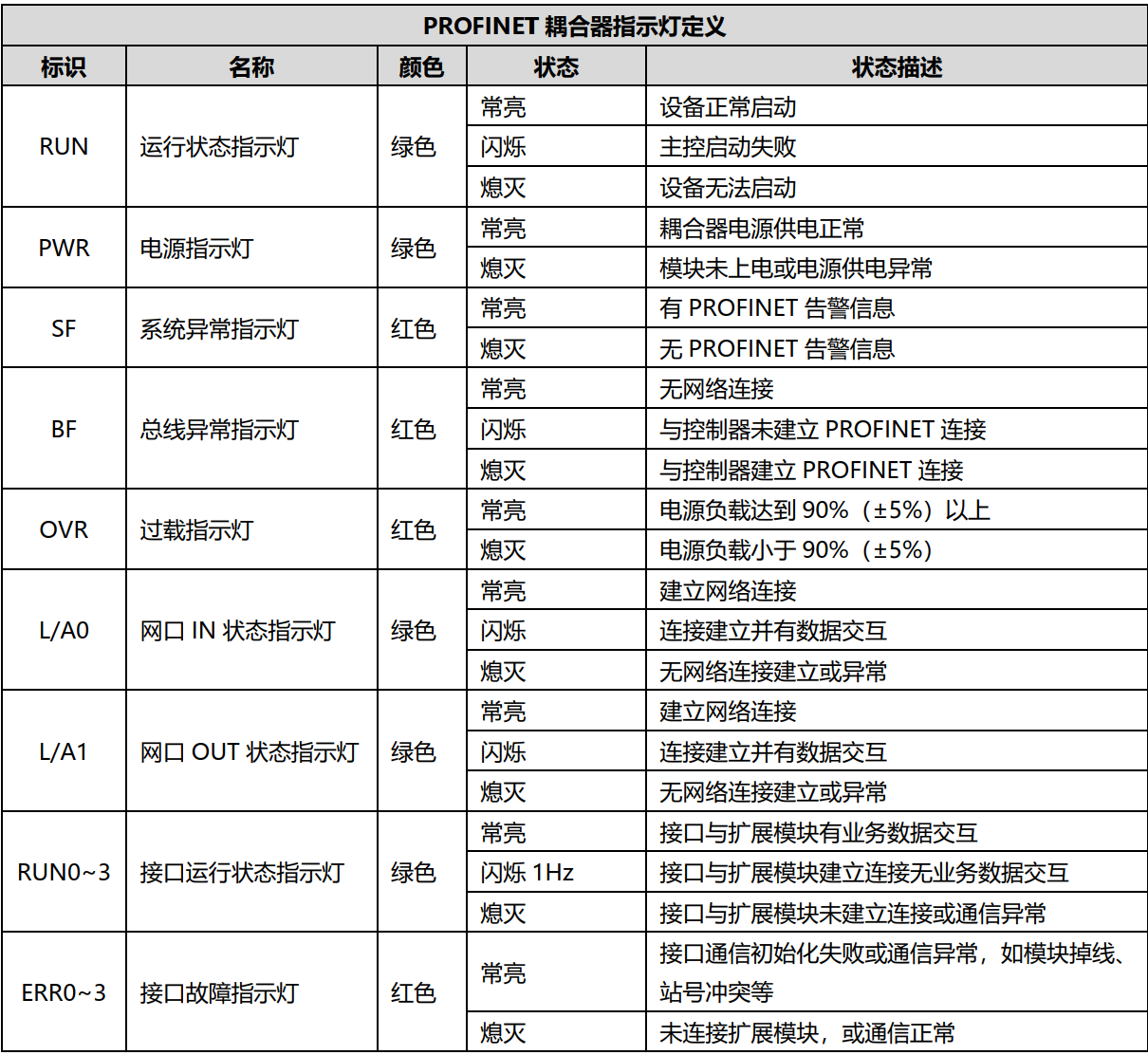
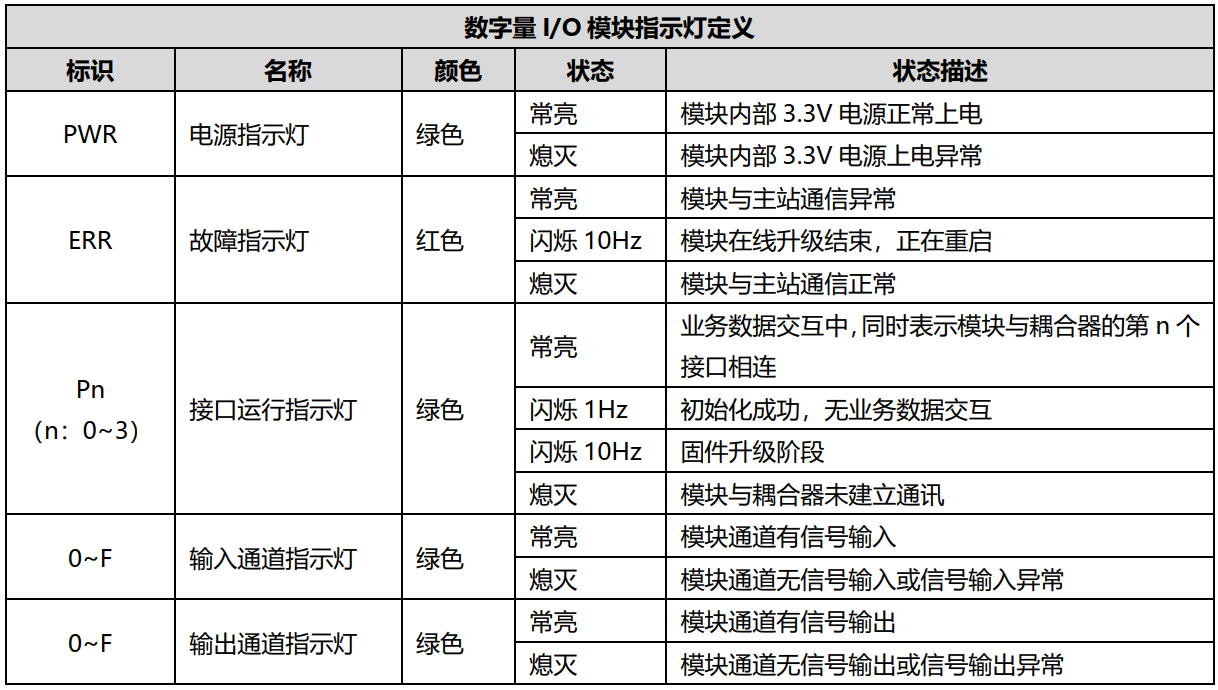
Before troubleshooting, it's essential to understand the definitions of the indicators on both the coupler and I/O modules to quickly locate issues based on their statuses.
Coupler indicator definitions will be listed here.
I/O module indicator definitions will be listed here.
2. Problem Symptoms and Resolution Steps
1. PROFINET Communication Protocol Layer Physical Network Link Disconnection
Q: Module Symptom
The L/A0 and L/A1 lights on the XBF4 coupler are both off.
A: Solution
① Check if the Ethernet cables between the coupler and the master station are normal and the connectors are secure (recommended to use Cat-5e or better factory-made cables).
② Check if the PLC's Ethernet port is functioning correctly and is being used properly.
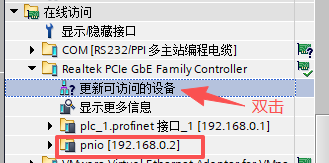
③ Check if the PLC software can discover the coupler.
2. XBF Bus Layer Physical Network Link Disconnection
Q: Module Symptom
① The RUN n (n: 03) lights on the XBF4 coupler are off; the EER n (n: 03) lights are off.
② The PWR, ERR, and Pn (n: 0~3) lights on the I/O modules are off.
A: Solution
① Check if the Ethernet cables between the I/O modules and the coupler are normal and the connectors are secure (recommended to use Cat-5e or better factory-made cables).
② Check the pinout sequence of the RJ45 connectors on both ends of self-made or factory cables. Use straight-through cables; crossover cables are not required.
3. Terminal Resistor Not Installed
Q: Module Symptom
The Pn (n: 0~3) lights on the I/O modules are flashing or off.
A: Solution
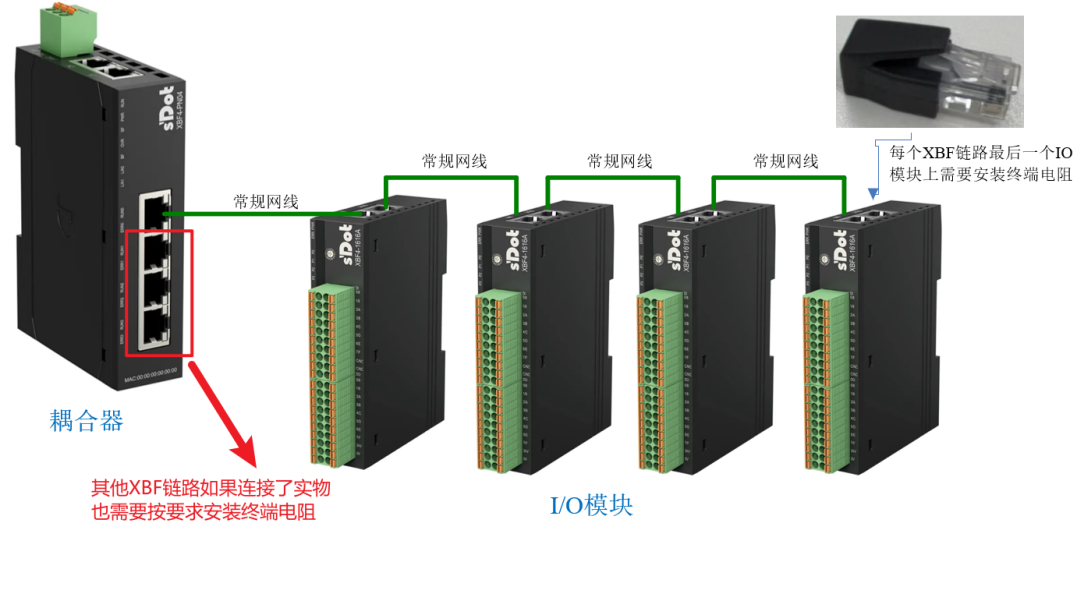
① Check if a terminal resistor is installed on the last I/O module of the used XBF chain (factory default is installed on the coupler). See the installation example for the first XBF chain in the figure below.
② For C3 valve terminals, an additional accessory is required for the terminal resistor.
4. I/O Module Station Address (Dial Switch) Conflict
Q: Module Symptom
① The RUN n (n: 03) lights on the XBF4 coupler are off; the EER n (n: 03) lights are solid on.
② The PWR light on the I/O module is solid on; the ERR and Pn (n: 0~3) lights are off.
A: Solution
Check for station address conflicts (duplicate dial switch settings) among I/O modules on the same XBF chain.
5. Mismatch Between Configured Rear I/O Module Types/Slot Order and Physical Modules, or Modules Not Configured
Q: Module Symptom
① The RUN n (n: 03) lights on the XBF4 coupler are flashing; the EER n (n: 03) lights are off.
② The PWR light on the I/O module is solid on; the ERR light is off; the Pn (n: 0~3) lights are flashing.
A: Solution
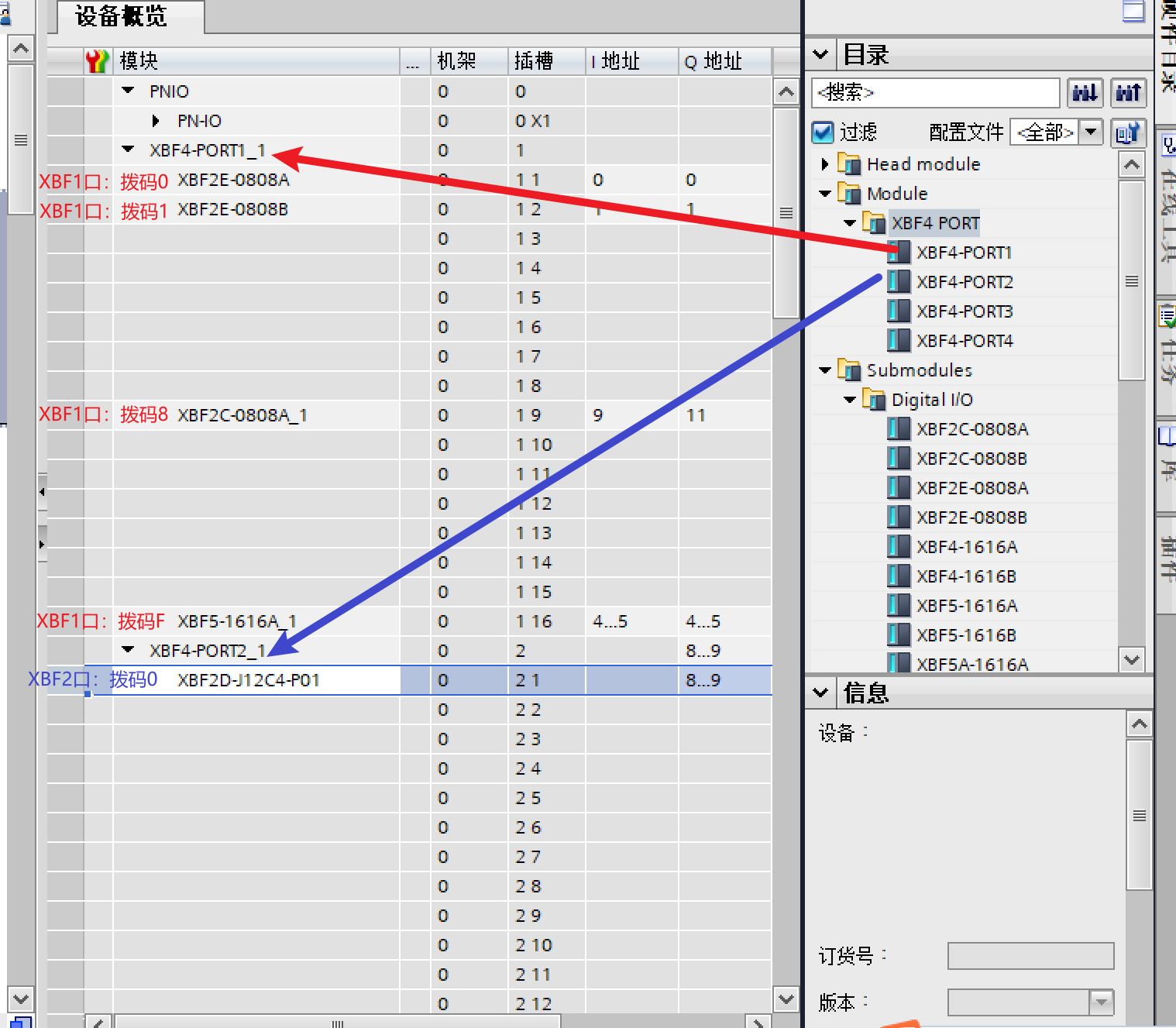
① Check if the configured PORT number matches the physical PORT the chain is connected to. PORT1-4 correspond to the coupler's four ports respectively.
② Check if the slot order and module types configured under each PORT match the physical dial switch settings and module models.
6. Coupler Device Name Mismatch, IP Address Conflict
Q: Module Symptom
① The RUN n (n: 03) lights on the XBF4 coupler are flashing; the EER n (n: 03) lights are off; the BF light is flashing; the RUN and PWR lights are solid on.
② The PWR light on the I/O module is solid on; the ERR light is off; the Pn (n: 0~3) lights are flashing.
A: Solution
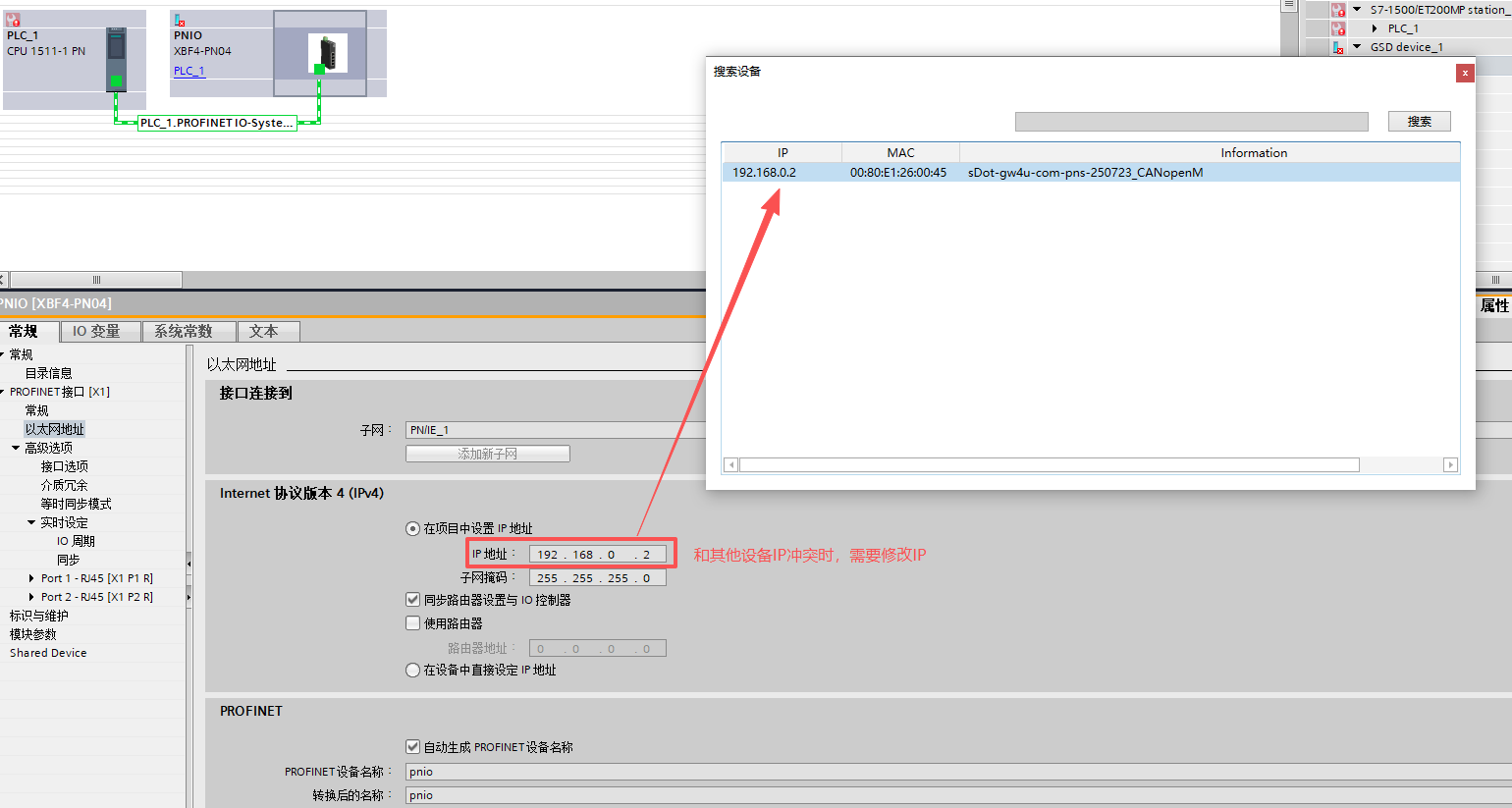
① Correctly assign the device name, download the hardware configuration, and power cycle the PLC.

② Check if the coupler's IP address conflicts with other devices on the network.
7. Incorrect Operation Sequence: Coupler Powered Before Connecting I/O Module Cables and Setting Addresses
Q: Module Symptom
① The RUN n (n: 03) and EER n (n: 03) lights on the XBF4 coupler are off.
② The PWR light on the I/O module is solid on; the ERR and Pn (n: 0~3) lights are off.
A: Solution
① Follow the correct sequence: Ensure the XBF4 coupler is powered off. First, complete the I/O module address dialing, install the terminal resistor on the last module of each XBF chain, and connect the I/O module cables to the XBF coupler (these 3 steps have no priority order). Then, power on the XBF coupler.
② If the sequence was incorrect, power cycling the coupler can also resolve the issue.
8. Incorrect Power Supply Wiring
Q: Module Symptom
The PWR light on the XBF4 coupler is not on.
A: Solution
① Supply power correctly according to the wiring diagram. The PWR light should turn on.
② If power supply voltage is unstable or ramps up stepwise, re-power the module and ensure stable supply voltage.
9. XBF4 Coupler Malfunction
Q: Module Symptom
① The PWR light remains off after multiple power cycles, but a multimeter check confirms normal power supply.
② Only the PWR light on the coupler is solid on; all other indicators are off.
③ With no I/O modules connected, the EER n (n: 0~3) lights remain solid on after a power cycle.
A: Solution
① If the coupler is abnormal, it needs to be replaced.
② If the coupler is damaged, it needs to be replaced.
10. I/O Module Malfunction
Q: Module Symptom
① The I/O module's PWR light remains off after multiple coupler power cycles, despite confirmed normal power supply and normal cables between coupler and I/O module.
② Only the PWR light on the I/O module is solid on; the ERR and Pn (n: 0~3) lights are off.
A: Solution
① If the I/O module is abnormal, it needs to be replaced.
② If the I/O module is damaged, it needs to be replaced.
11. Master PLC Malfunction
Q: Module Symptom
The PLC cannot switch states or frequently reports bus alarms.
A: Solution
① Consult the specific PLC model's manual for verification. For detailed current status information, consult the controller manufacturer.
② PLC resources may be insufficient to handle more modules.
12. Strong Interference Causing Disconnection or Failed Communication
Q: Module Symptom
① Packet loss occurs in bus communication.
② The XBF4 coupler shows RUN light flashing or熄灭 (off) communication alarms.
A: Solution
① Interference can come from two aspects: power signals and communication. Identify the interference source and optimize wiring to stay away from sources like high-power inverters, servo motors, and drives.
② Add ferrite cores to Ethernet cables to reduce interference.
③ Use shielded Ethernet cables whenever possible.
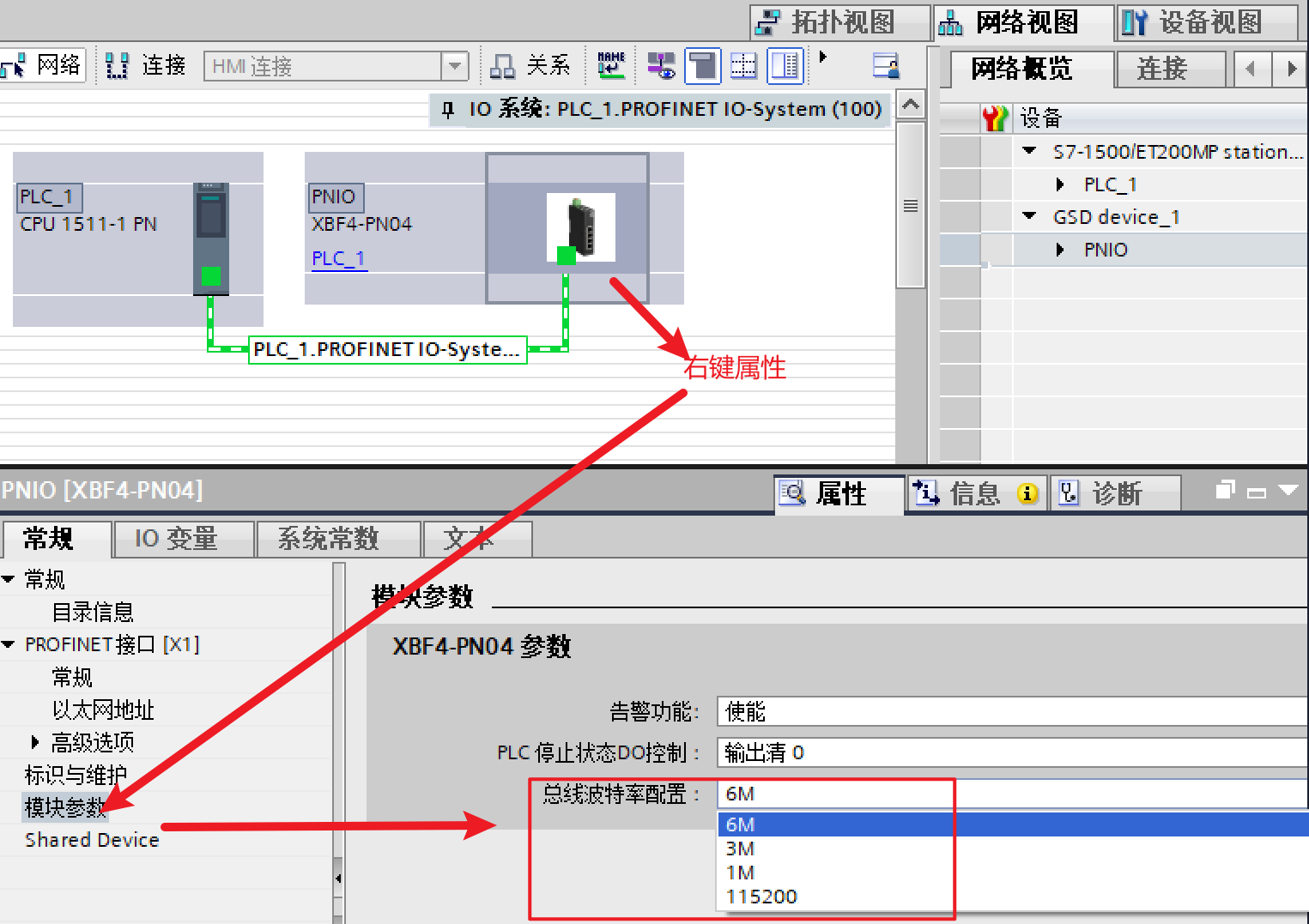
④ Reduce the baud rate of the XBF4 coupler. The default highest is 6MHz; it can also be set to 3M, 1M, or 115200 baud.
The above is the Solidot Distributed I/O XBF4-PN04Troubleshooting and Resolution Guide for Communication Issues.