Knowledge

How to check common communication problems between remote IO and CC-Link IE Field Basic protocol PLC
When using a PLC with the CC-Link IE Field Basic protocol in industrial automation applications, abnormal conditions such as remote I/O inputs not being captured or outputs not responding may occur. This issue takes the XB6S-CB2002 Coupler as an example to explain how to check for these abnormal conditions. The specific method is as follows:

↑ 693000 Slice I/O Coupler XB6S-CB2002
I. Check the error alert
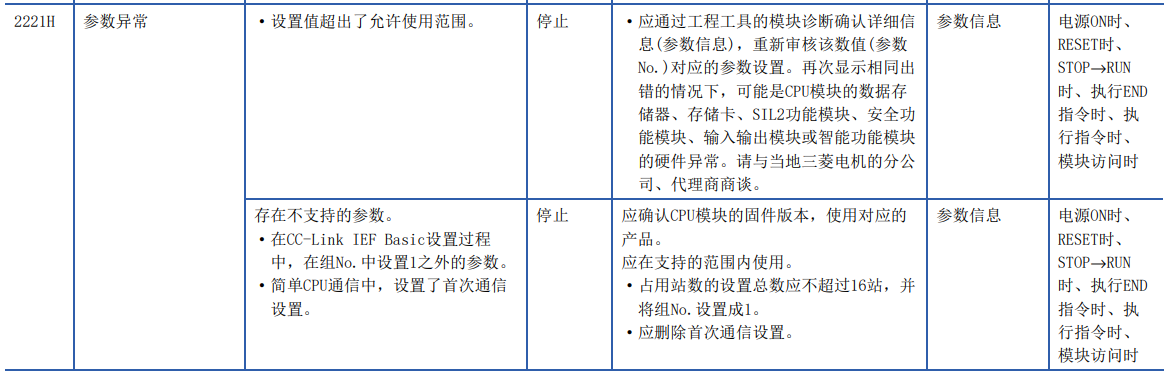
First, open the CPU to check the Diagnostics error alert. The error alert shows that the CC-Link IE Field Basic network contains unsupported parameters. This may be because the Start Address configured for the XB6S-CB2002 Coupler and I/O module occupies the PLC's local reserved point X0Y0. For example, the R04ENCPU has no local points, but a local expansion point can be installed on the slot. The issue is resolved after modifying the refresh-side Address.
II. In-depth investigation and handling
When this issue occurs on site, an in-depth investigation and handling can be carried out from the following aspects:
1. Address check
Carefully check the Start Address settings of the XB6S-CB2002 Coupler and the I/O module to ensure they do not conflict with the PLC's local reserved point. If a conflict is found, modify the Start Address to avoid occupying the local reserved point. In addition, conduct a full review of the PLC's address allocation table to confirm whether the address assignment of each module is reasonable and whether there is any duplicate allocation.
2. Hardware check
Check whether the local expansion point installed on the slot is correctly installed and working properly. Try re-plugging the local expansion point to ensure a good connection.
3. Software check
Check the PLC's programming software settings to confirm whether the Configuration of the XB6S-CB2002 and the I/O module is correct, including communication parameters, address settings, Module Type and other settings. Also check whether other software or programs are conflicting with the PLC's communication. Try closing other software or programs that may affect PLC communication and observe whether the issue is resolved.
The above are the common troubleshooting methods for communication issues between remote I/O and a PLC using the CC-Link IE Field Basic protocol. If you have any questions, please feel free to contact us. We will be happy to help!