Knowledge

Quick overview of this document
1. Example products
IOL7A-EC01B-8A, IOL7A-16CB-M12
2. Applicable platform
Inovance iFA Evolution + EVO series PLC
3. System roles
IOL7A-EC01B-8A is connected as an EtherCAT Slave and provides 8 IO-Link ports (X00 ... X07) downstream
4. Core steps
Import ESI file → Add slave → port (Slot) configuration → Manually enter startup parameters → Assign I/O mapping
5. Key prerequisites
The port mode must correspond one-to-one with the device actually connected
6. Key notes
iFA Evolution does not automatically generate startup parameters; they must be entered manually. If skipped, the Slot configuration does not take effect.
IOL7A-EC01B-8A and IOL7A-16CB-M12 are IO-Link products in the Solidot metal-housing series. The former is an IO-Link Master (EtherCAT protocol) and the latter is an IO-Link HUB. The iFA Evolution platform supports Real-time Industrial Ethernet buses such as EtherCAT, and IOL7A-EC01B-8A can be connected to the system as an EtherCAT Slave. In this combination, digital I/O can either be provided directly by the ports of IOL7A-EC01B-8A or extended via IOL7A-16CB-M12 (16-channel Configurable input/output, PNP).
This document provides a complete description of the configuration process for this digital application, from system composition and preparation before configuration to port configuration, startup parameters and assignment testing.
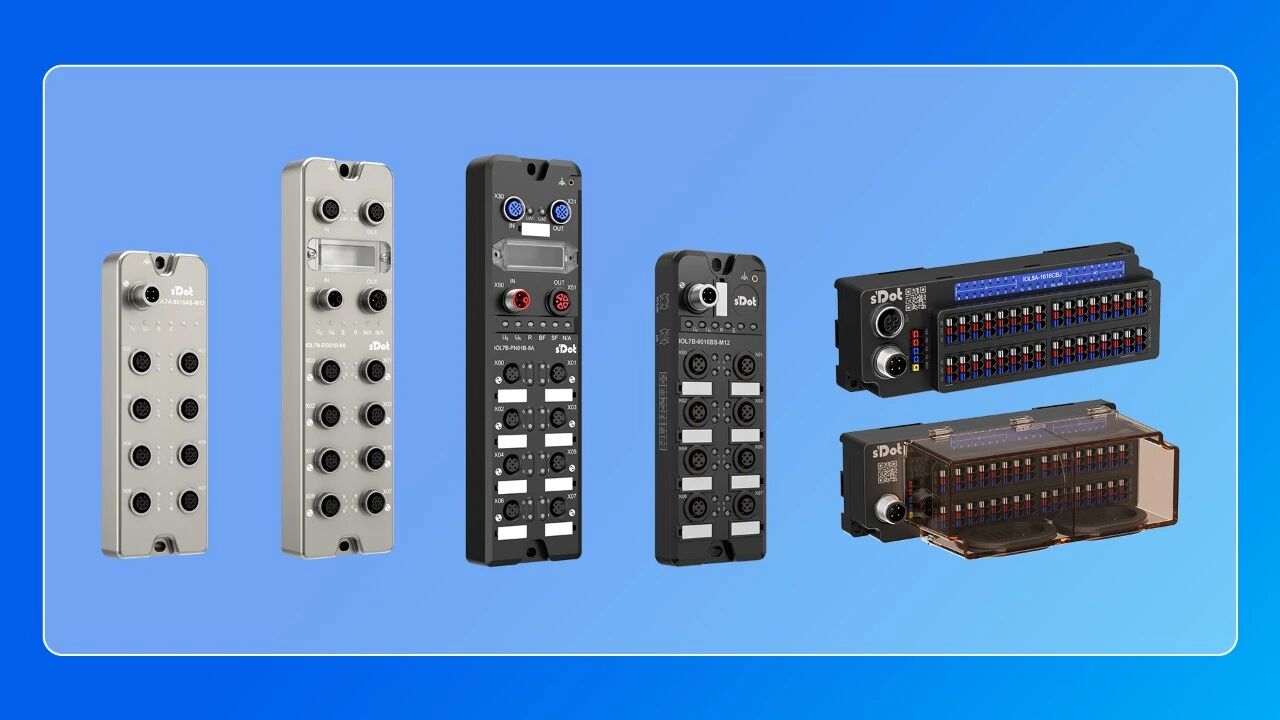
Overview of Solidot IO-Link series products
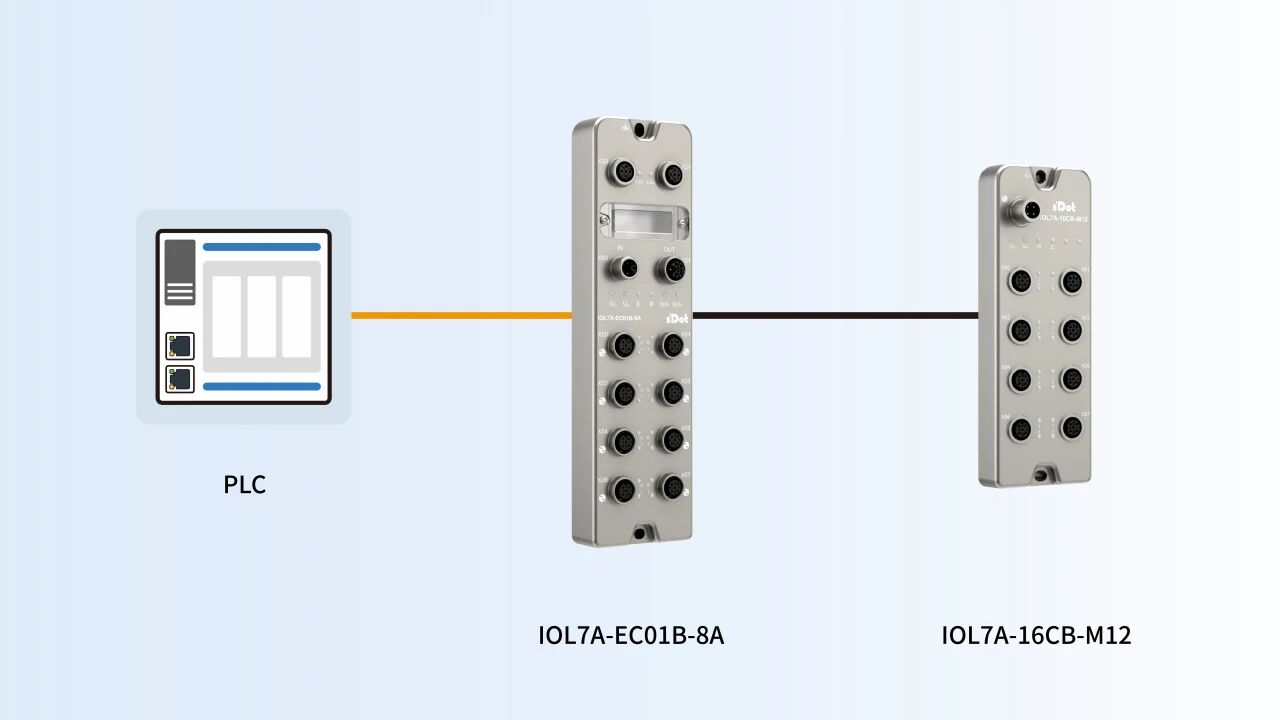
System composition and topology
The system described in this document consists of the following three parts:
· EVO series PLC: runs the iFA platform project and acts as the EtherCAT Master;
· IOL7A-EC01B-8A: EtherCAT Slave / IO-Link Master;
· IOL7A-16CB-M12: IO-Link digital HUB, connected to the IO-Link port of IOL7A-EC01B-8A.
Preparation before configuration
· software: install the Inovance iFA Evolution programming software.
· device description file: prepare the ESI (EtherCAT Slave description) file for IOL7A-EC01B-8A and import it into the software.
· hardware connection: complete the power supply and EtherCAT Ethernet cable connection for the EVO PLC and IOL7A-EC01B-8A; connect IOL7A-16CB-M12 to the IO-Link port of IOL7A-EC01B-8A via an IO-Link cable.
Configure IOL7A-EC01B-8A on the iFA platform
Step 1: Create a new EVO PLC project or open an existing one
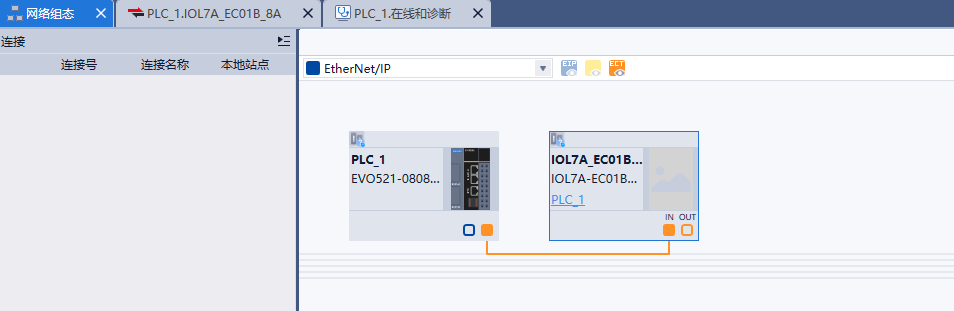
Step 2: Mount the slave in the network configuration
Select the imported IOL7A-EC01B-8A xml and mount it as an EtherCAT Slave node, as shown in the figure below.
Step 3: Port (Slot) configuration.
Each port of the IOL7A-EC01B-8A can be configured with its own operating mode. Typical configuration examples are shown below:
Port | Configuration mode | Purpose |
X00 | IO-Link mode | Connect toIOL7A-16CB-M12(IO-Link digital HUB, 16-point DI/DO auto-adaptive, PNP) |
X01 | DO mode | Directly drive digital output |
X02 ... X07 | Configure as required | IO-Link/DI/DO, selected according to the field device; default is DI |
X00-PIN2 | Digital-DO | Supply power (Ua) to theIOL7A-16CB-M12connected to the X00 port |
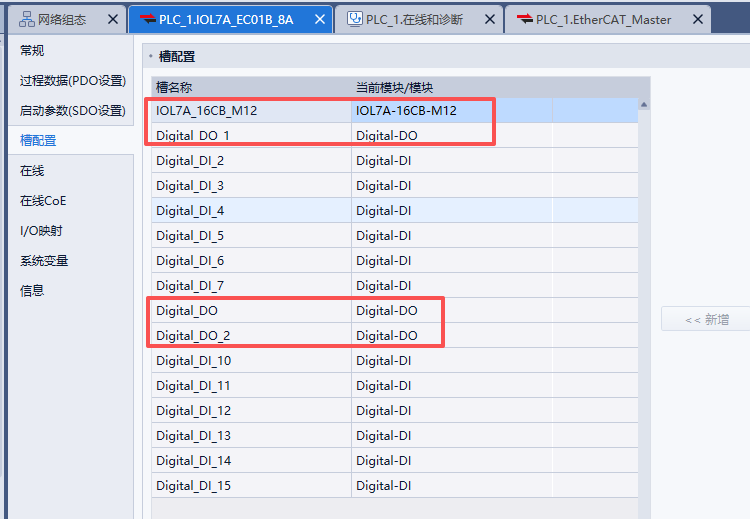
The port mode determines whether that port communicates via the IO-Link protocol or is used as a standard digital (DI/DO) channel, and must match the device actually connected to it one-to-one.
Step 4: Manually configure the startup parameters
This step differs from what is required on most mainstream PLCs on the iFA platform, and it is the point in this article that deserves the most attention.
In the device properties of the IOL7A-EC01B-8A, open [Startup parameters (SDO settings)] and enter the corresponding parameters one by one according to the actual mode of each port and the connected device. The parameters are described below:
Parameter | Meaning | Value |
Master control | Master control mode | 1 represents DI, 2 represents DO, 3 represents IO-Link mode |
Process data In length | Input data length | Enter according to the actual port configuration |
Process data Out length | Output data length | Enter according to the actual port configuration |
The following two figures show the startup parameters generated in CODESYS and how they are actually entered in iFA Evolution, respectively, for comparison.
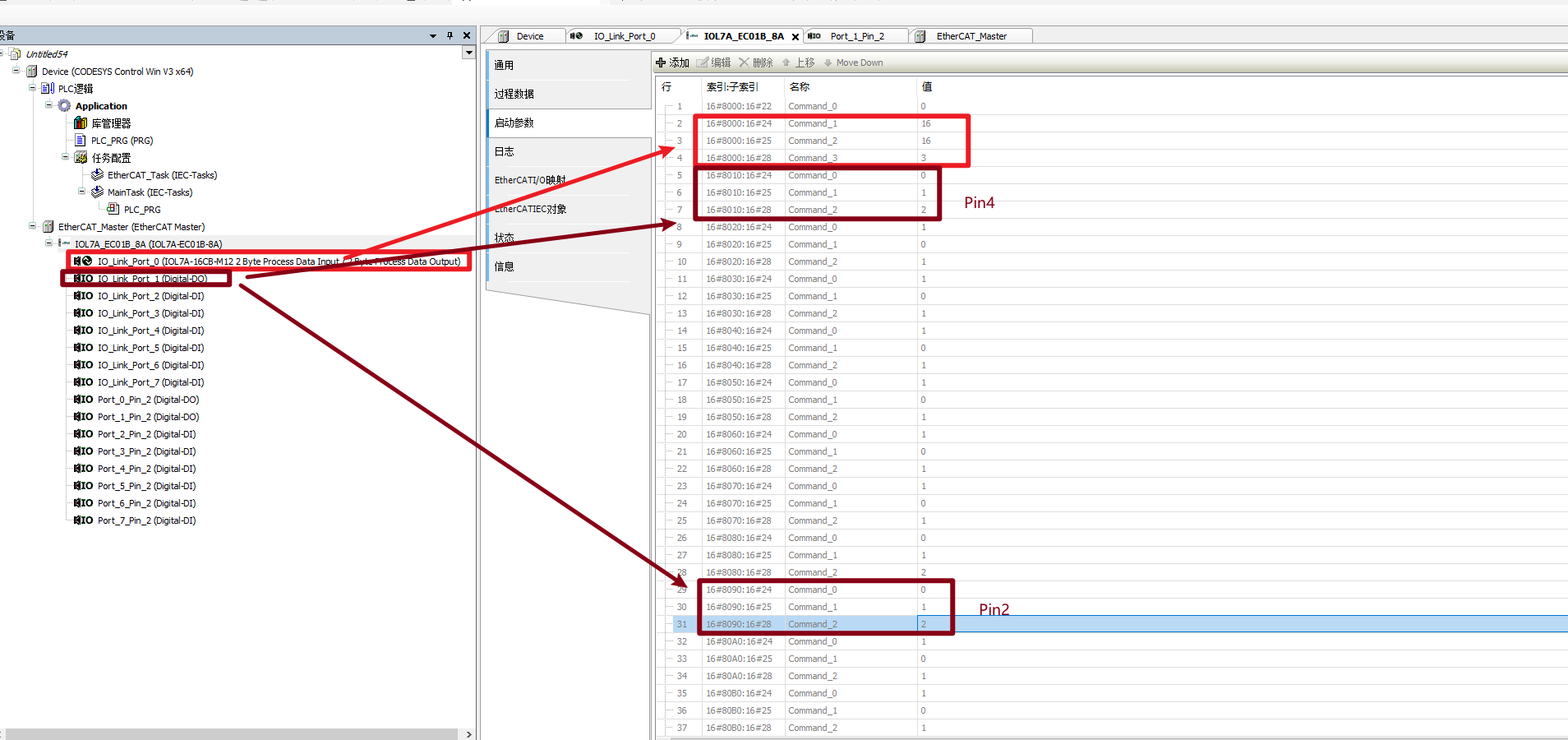
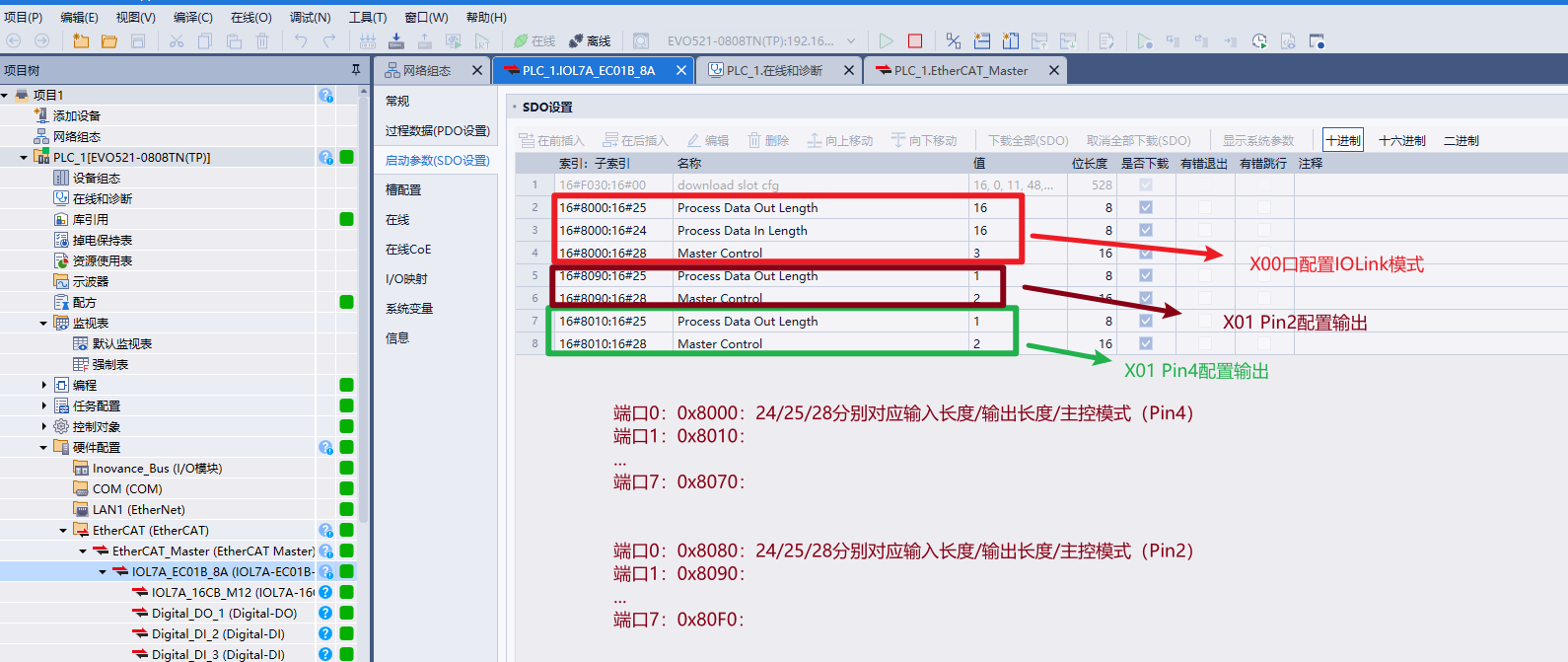
Taking the example project in the figure above, the indexes for ports 0 ... 7 of the pin4 channel are 0 x 8000, 0 x 8010 ... 0 x 8070, and the indexes for ports 0 ... 7 of the pin2 channel are 0 x 8080, 0 x 8090 ... 0 x 80F0:
channel | Indexes corresponding to ports 0 ... 7 |
Pin4 | 0 x 8000, 0 x 8010, 0 x 8020 ... 0 x 8070 |
Pin2 | 0 x 8080, 0 x 8090, 0 x 80A0 ... 0 x 80F0 |
Within the same port, subindex 0 x 24 is the input data length, 0 x 25 is the output data length, and 0 x 28 is the master control mode.
IV. Assignment test
Once configuration is complete, proceed to the assignment test. In the I/O mapping view of iFA, locate the variable corresponding to X00-PIN2 DO and assign a value to it — this step supplies Ua power to the IOL7A-16CB-M12 connected to port X00.
The inputs and outputs of the IOL7A-16CB-M12 are self-adaptive; input values can be monitored directly in the I/O mapping, and outputs can also be assigned values.
In summary, the digital application of the IOL7A-EC01B-8A on iFA Evolution depends on two key steps: first, the port mode must match the device actually connected one-to-one; second, the startup parameters must be entered manually one by one. Once these two steps are done correctly, both the DI/DO provided by the onboard ports and the digital signals expanded by the IOL7A-16CB-M12 can be monitored and assigned normally in the I/O mapping.